Computers are a part of everyday life, but many students still get confused between hardware and software. Understanding the difference is important not only for exams, but also for basic computer knowledge.
This article explains hardware and software in a simple way, with clear examples.
What Is Hardware?
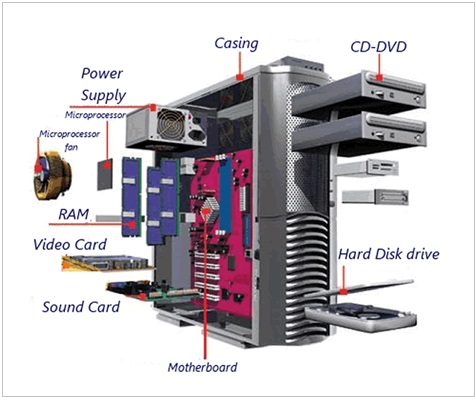
Hardware refers to the physical parts of a computer—the components you can see and touch.
Examples of Hardware
- Keyboard
- Mouse
- Monitor
- CPU (Central Processing Unit)
- Printer
- Hard disk
- RAM
If you can physically touch it, it is hardware.


What Is Software?
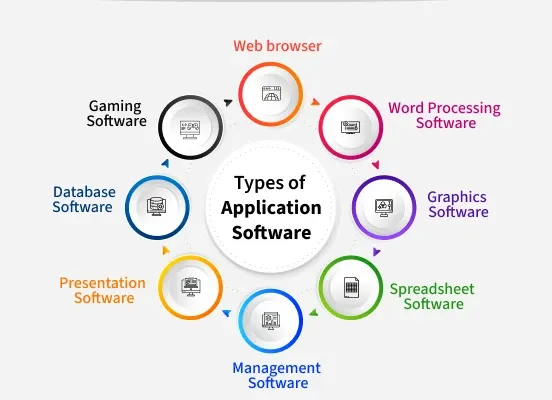
Software refers to the programs and instructions that tell the computer what to do. Software cannot be touched physically.
Examples of Software
- Operating systems (Windows, Linux, macOS)
- Microsoft Word
- Web browsers (Chrome, Firefox)
- Mobile apps
- Games
Software makes the hardware useful.

Key Differences Between Hardware and Software
| Hardware | Software |
|---|---|
| Physical components | Programs and instructions |
| Can be seen and touched | Cannot be physically touched |
| Needs software to function | Needs hardware to run |
| Wears out over time | Does not wear out physically |
| Manufactured | Developed / programmed |
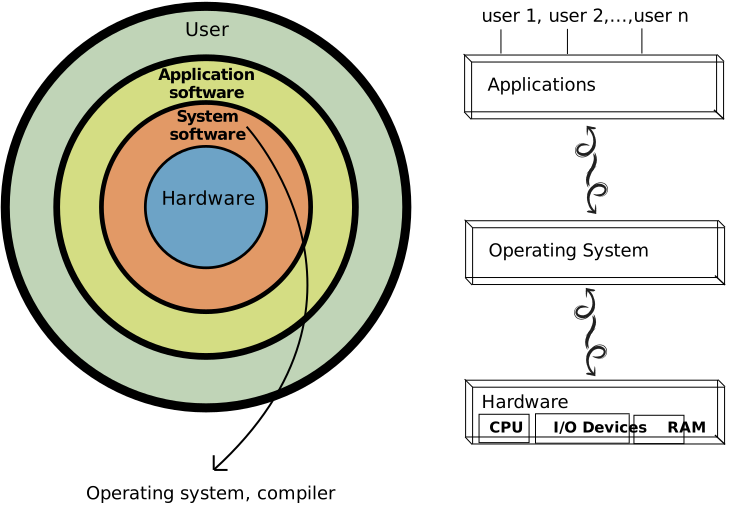
How Hardware and Software Work Together
Hardware and software depend on each other.
Example:
- Hardware: Keyboard
- Software: Word processor
When you press keys on the keyboard (hardware), the word processor (software) displays the text on the screen.
Without software, hardware is useless.
Without hardware, software cannot run.
Types of Software (Brief Overview)
1. System Software
- Controls and manages hardware
- Example: Operating systems
2. Application Software
- Helps users perform tasks
- Example: Word processors, browsers, games
Common Mistakes Students Make
- Thinking hardware can work without software
- Calling apps “hardware”
- Forgetting examples in exams
Remember: Hardware = touchable, Software = untouchable.
Exam Tip for Students
In exams:
- Always give definitions
- Include at least two examples
- Use a comparison table if allowed
This helps secure full marks.
Understanding the difference between hardware and software is a foundation of computer studies. Once this concept is clear, advanced topics like operating systems and programming become much easier.